Cross Stitch Photoshop Action Review
First Impressions: A Warm, Handmade Feel
From the moment I opened the Cross Stitch Photoshop Action, I was struck by its charm and simplicity. The design feels like a cozy afternoon in a craft studio—sweet, elegant, and just the right amount of detail to make it feel handmade. It’s not overwhelming, but it carries enough character to be emotionally appealing. The mood is gentle, almost nostalgic, which makes it perfect for personalized gifts that carry sentimental value.
What Makes This Add-On Stand Out?
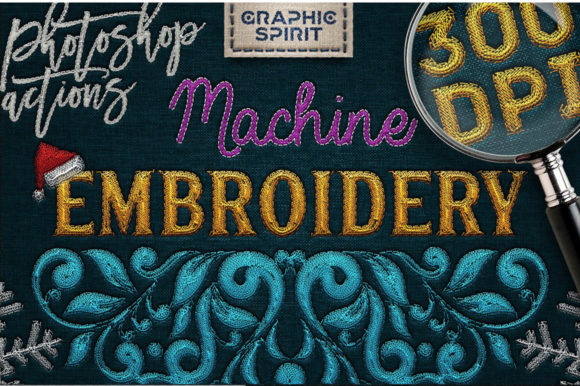
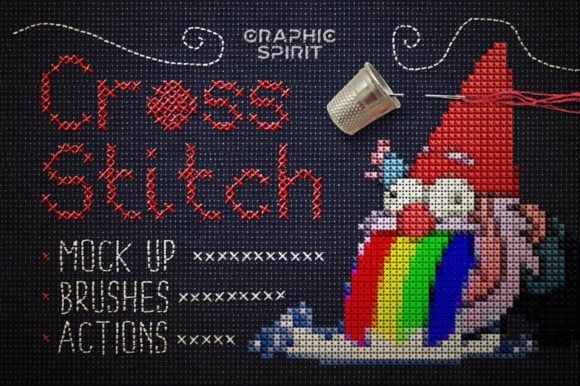
The Cross Stitch Photoshop Action is a powerful tool for anyone looking to create custom embroidery designs. It allows users to turn any graphic into a cross-stitch style with the help of embroidery brushes and free fonts. The included files—Quick Start Cross Stitch.psd and Canvas Styles.asl—make it easy to get started without prior experience in Photoshop or design software.
As an experienced embroidery designer, I found the interface intuitive and the process surprisingly smooth. It’s a great option for both beginners and seasoned creators who want to experiment with new ideas. Whether you're designing for Etsy, a small shop, or a custom order, this add-on offers flexibility and creativity.
Perfect for Personalized Gift Products
One of the most exciting aspects of Cross Stitch Photoshop Action is its versatility. It can be used for a wide range of personalized gift products, including baby embroidery, wedding gifts, family keepsakes, and more. For instance, a baby blanket with a sweet cross-stitched design can become a cherished heirloom, while a custom pillow cover or embroidered towel can add a personal touch to any home.
Wedding gift designers will find this tool especially useful for creating meaningful keepsakes. A cross-stitched name, date, or symbol can be transformed into a beautiful embroidery design that adds a romantic or classic feel to a wedding-themed product. Similarly, nursery items such as aprons, tote bags, and fabric decor can benefit from the soft, textured look of cross-stitch patterns.
Where to Use Carefully
While the Cross Stitch Photoshop Action is a fantastic resource, there are certain scenarios where it should be used with caution. Small lettering and delicate details may not translate well to thick towels or stretchy baby clothes, as these materials can distort the design. Likewise, curved surfaces and dark fabrics may require additional testing to ensure visibility and clarity.
It's also important to consider fabric texture when using this tool. Textured fabrics like linen or cotton blends can enhance the visual appeal of cross-stitch designs, but they may also affect stitch density and thread color contrast. Always test on scrap fabric before committing to a final product, especially if you're working with commercial embroidery or selling finished products.
Boosting Giftability and Perceived Value
When it comes to giftability, the Cross Stitch Photoshop Action can significantly enhance the perceived value of your handmade products. A well-designed cross-stitched pattern adds a level of craftsmanship and care that resonates with customers looking for unique, personalized items. This is especially true for Etsy sellers and small shop owners who rely on emotional connection and customer trust to stand out in a competitive market.
By using this add-on, you can create digital embroidery files that are ready for print or direct embroidery. These files can be used for product photography, allowing you to showcase your designs in high quality. A clear, detailed mockup can increase buyer engagement and reduce returns by setting realistic expectations for the finished product.
Practical Embroidery Notes for Success
To ensure the best results when using Cross Stitch Photoshop Action, there are a few practical steps to follow. First, always test your design on scrap fabric to check for any issues with stitch density or thread color contrast. Confirm the hoop size based on the design complexity and fabric type, and use proper stabilizer to prevent puckering or distortion.
Review the stitch density to ensure it matches the intended use of the product. For example, a delicate cross-stitch pattern on a pillow cover may require a different approach than a bold design on a thick towel. Compare light and dark fabric mockups to see how the design looks in different settings. Finally, confirm commercial licensing terms before selling finished products to avoid any legal issues.
Conclusion: A Reliable Tool for Custom Embroidery
The Cross Stitch Photoshop Action is a valuable addition to any embroidery designer’s toolkit. It offers a blend of creativity, ease of use, and flexibility that makes it ideal for a wide range of personalized gift products. Whether you're crafting baby embroidery, wedding gifts, or custom tote bags, this add-on can help you create beautiful, handcrafted designs that resonate with your customers.